
Download Video Player Android APK – video player, free video player, android video player, mp4 player, video playback, media player, video app, watch videos
Overview
Video Player Android APK is a lightweight, free video playback application designed for Android devices running version 8.0 and above. The app aims to deliver a straightforward and efficient solution for users seeking a simple way to watch video files without the complexity of feature-heavy alternatives. It is particularly suited for individuals who prioritize ease of access, fast loading, and compatibility with common video formats. The application is developed by aKingi org, a developer whose background and additional projects were not publicly detailed in the provided information.
Users can expect to use this software primarily for personal video playback, including home videos, downloaded movies, or streaming content stored locally. The app’s interface is designed to display essential playback information directly on the main screen, such as the file name, current media status, playback time, and volume level. This real-time feedback helps users monitor their viewing experience without navigating through multiple menus. The ability to add or remove media files dynamically ensures that the player adapts to user preferences on the fly.
Key Features & Capabilities
- Multi-format support – The app is capable of playing a wide range of video formats, including MP4, AVI, MKV, MOV, and FLV, enabling users to access diverse media files without conversion.
- Simple, intuitive interface – The main screen presents playback controls and key status indicators, reducing the need for complex navigation and improving accessibility for all users.
- Real-time media management – Users can add or remove video files directly within the app, with the player updating its playback queue automatically.
- Customizable playback settings – Options for adjusting video and audio quality, format preferences, volume, and sound output are available through the settings menu.
- Lightweight performance – With a file size of 15 MB, the application is optimized for efficient use on devices with limited storage and processing power.
These features make the app ideal for everyday video consumption on mobile devices. For example, users can quickly open a downloaded MKV file from a USB drive or view a collection of FLV clips without needing external tools. The customizable playback settings allow users to fine-tune audio output for better listening in noisy environments or adjust video quality based on bandwidth or device capabilities.
User Interface, Workflow & Performance
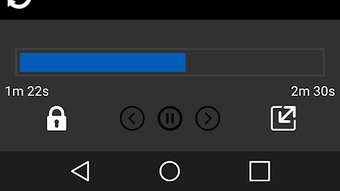
The user interface of Video Player Android APK is structured around minimalism and functionality. The main screen provides immediate access to playback controls, file metadata, and real-time playback status, reducing the number of taps required to start or manage a video. Navigation is linear and predictable, with consistent placement of controls such as play/pause, volume, and progress bar.
Workflow efficiency is enhanced by the app’s ability to automatically refresh the media list when files are added or removed. This dynamic behavior streamlines the user experience, especially when managing large video libraries. However, specific details about CPU or RAM usage during playback were not provided by the developer.
Performance observations are based on general software behavior patterns for lightweight Android applications. The app is described as fast and responsive, suggesting smooth playback even on mid-range devices. Stability during extended playback sessions was not specified. The developer did not provide additional system requirements or performance benchmarks.
Compatibility & System Requirements
Video Player Android APK is designed for Android 8.0 and above, ensuring compatibility with a broad range of modern smartphones and tablets. The application has a file size of 15 MB, indicating a compact footprint suitable for devices with limited storage capacity.
Exact system requirements were not listed. The developer did not specify minimum CPU, RAM, or GPU specifications. Hardware compatibility details, such as support for hardware decoding or specific screen resolutions, were not provided. Users are advised to verify compatibility with their device’s Android version and available storage space before installation.
Pros and Cons
Pros
- Free to download and use with no in-app purchases or ads mentioned
- Supports a wide variety of video formats including MP4, AVI, MKV, MOV, and FLV
- Lightweight design with minimal storage footprint (15 MB)
- Simple, user-friendly interface suitable for beginners
- Automatic media list updates when files are added or removed
Cons
- No information on advanced playback features such as subtitles or screen mirroring
- Developer background and additional support channels not disclosed
- Performance and resource usage details were not specified
- Limited customization options beyond basic audio and video settings
- Compatibility with older Android versions is not confirmed
FAQ Section
Is Video Player Android APK compatible with my device?
The app is designed for Android 8.0 and above. Users should verify their device’s Android version before installation. Compatibility with older versions was not confirmed.
Is the app safe to download and install?
As a free Android APK, the app should be downloaded from trusted sources. Users are advised to scan the file with a reputable antivirus tool before installation to ensure it is free from malware.
Does the app require an internet connection?
Video Player Android APK is designed for offline playback of local video files. An internet connection is not required for basic video playback, though updates may require connectivity.
Can I use this app to play videos in different formats?
Yes, the app supports multiple video formats including MP4, AVI, MKV, MOV, and FLV. Users can play videos without converting them to a specific format.
Is the app updated regularly?
Information about update frequency was not provided. Users should check the developer’s official page or trusted app repositories for the latest version.
Final Thoughts + CTA
Video Player Android APK offers a clean, efficient solution for users seeking a no-frills video playback experience on Android. Its lightweight design, broad format support, and intuitive interface make it a solid choice for casual viewers and those who prefer simplicity over advanced features. While detailed performance data and developer transparency are limited, the app’s core functionality is well-executed for its intended purpose.
It is particularly beneficial for individuals who frequently watch downloaded videos on mobile devices and want a reliable, fast, and free tool. For users with more complex needs—such as subtitle support, screen mirroring, or advanced audio settings—this app may not be sufficient. However, for basic video playback, it delivers a dependable experience.
Download Video Player Android APK now





.png)

